
Intern Resources
Welcome to the Woodstock Film Festival Internship Program! Below you will find a lot of info, so please take the time to go through it all. Let us know if you have any questions!
SLACK
This will be our main means of communication during your internship.
Once you receive an invitation to your personal email:
Update your photo
Use your full name
Add your phone number to your profile
Once you’re set up, you might get added to different “channels” such as “fall interns” or “operations.”
Learn more about Slack HERE
MONDAY.COM
This is our project management software. You will be tagged in tasks, updates, etc.
If you are granted an invitation via your personal email:
Update your photo, use your full name
If you are assigned a task personally, keep all communication about that task within Monday.com for ease
Refer to the “How-To + Exercises for Interns” monday.com document.
Refer to the “Intern Projects” board and Content + Editorial Planning where you will get assigned tasks.
Learn more about Monday.com HERE.
Review this document to learn about the people who make up the WFF Staff! If you are interning during festival season, you may also read about the seasonal staff (June-October).
ACCESSING GOOGLE DOCS, FOLDERS, PASSWORDS
When you create new Google documents, do not log in with your personal Gmail but use interns@woodstockfilmfestival.org
To create or access any Google Docs, Spreadsheets, Google folders, or other files, you must be logged in using your assigned WFF email address (e.g., interns@, operations.intern@, or press.intern@). If you are logged in with your personal Gmail account, you will not have access. Simply switch accounts to your WFF email.
If you need any passwords to something that you were not already given, please include Cynthia and Teressa in that ask.
Please log in to LastPass using the credentials we provide and download the Google Chrome extension so we can share passwords with you securely.
ADDING YOUR SCHEDULE TO THE GOOGLE CALENDAR
HOW TO:
Log into interns@ via Google.
Go to Calendar
Create a new event in the INTERN SCHEDULE calendar (not intern email calendar - you’ll see the drop down)
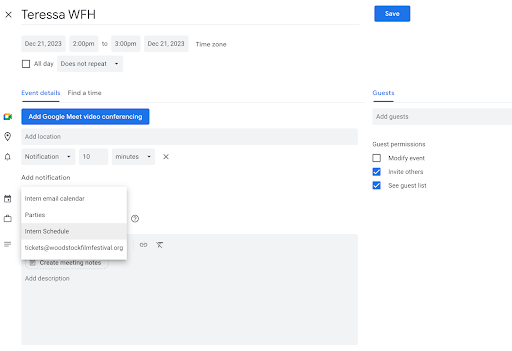
Customize it so that it has an end date. (drop down where it says “does not repeat”) You can repeat days/times for instance if you’re in Monday, Wed, Friday 10am 4pm you can set that. Set the end date (ok if you are unsure of exact last day, just ballpark it.)
Be sure to indicate if you are WFH (remote/working from home) or in office.
If you have changes to your schedule, update the calendar as such. I.e. you are not in on a normal scheduled day/leaving early/etc.
Slack Teressa upon completion of this task.
***IMPORTANT! If you have changes to your schedule, running late, ill, working from home instead of in office you must FIRST contact Cynthia Kane. If you are working with Casey or another staff member closely, you must ALSO update them. You can Slack them together or email them both. THEN update the calendar as such.**
Learn more about Google Calendars HERE.
MAKE A WEEKLY LOG OF YOUR PROGRESS
MAKE A COPY, SAVE IT WITH YOUR NAME AND TIME OF INTERNSHIP. (“BOB SMITH_INTERNSHIP LOG_FALL 2025”)
SAVE IT IN THIS “INTERNSHIP LOG” FOLDER
You should have three sections in your log: Initial Tasks check, weekly log, and after internship questions.
SOCIAL MEDIA & NEWSLETTER
Find us and follow us on all social media (if you are on these platforms):
Subscribe to our YouTube channel
Follow us on LinkedIn
Get familiar with how we post/how often/etc. Subscribe and READ our monthly newsletters so you can help us to create them. Immerse yourself in all of our content :)
Intro to Buffer & Scheduling Social Media Posts: Watch the Instructional Video
Subscribe to our mailing list

WEBSITE REVIEW
Look into our upcoming / past events to see what we are up to year-round
Study our merch options and all the other parts of our website to better understand WFF
Take a look at our archives over the years
You will probably be asked to help update the website. Please watch these videos about SQUARESPACE.
https://youtu.be/Fo0Yr8IspYY?si=6FjSidueGiVxkAaC
https://youtu.be/UBfXDc_ZyPI?si=b1BY5wALBFKZ2KOV
ANSWERING THE OFFICE PHONES
Refer to THIS document on how to answer the phones. If the phone rings, please answer it.
CHECKING THE POST OFFICE BOX AND PHYSICAL MAILBOX
When you are in the office, ask Cynthia if you are needed to check the mail. They will give you the keys.
Drive to: 2 Woodstock Meadows Ln, Woodstock, NY 12498. You make a right out of the office, right onto 212 (the main street that runs through all the little shops in Woodstock) and then a right into the PO.
Post Office Box #1406. Use the gold key to open it. If there is a yellow slip in the mailbox, that means we have a package so take it to the clerk and they will give you the package.
Return all mail to the Deputy Director.
The physical mailbox is the small black key. The black mailbox is located on the front of our building #13.
RETRIEVING PRINTED MATERIALS AT PRINT EXPRESS
This is common ask to pick up printed materials at our local print shop, Print Express. You might also be asked to send them a file for print in addition to then picking up. Using the interns@ email, you would email Erik – express12498@gmail.com – telling how many copies, size, any other info given to you. Then check back for when he says it’s ready to pick up. Located in the plaza across from Playhouse, near the entrance of town. 96 Mill Hill Road. Be careful pulling out!
PARKING
Winter/Spring Interns: Unless otherwise told, you may park in the WFF lot in front of the garage. But not to the right of the dumpsters, as that is Meira’s spot in these months. Nor in the “tenant only” spot along the back of the building.
Summer/Fall Interns: Due to limited space during these busier months, all interns are to park in the free parking lot across the street from Colony (make a left out of our office back onto Rock City Road, and your next left into the lot.) It’s the big lot that’s practically in our backyard. Please do not walk behind our neighbor Good Night to get to and from. Just be careful crossing the street. We need all of our parking spaces for guests and staff.
LUNCH/BREAKS
Please let supervisor(s) know when you’re taking a break. You can communicate in Slack for this. If you’re working on a time-sensitive task, please make sure there’s nothing else you need to do immediately, before taking a break.
Please feel free to join us at our year round events! You can do things like help set up, check people in, sell merch, and an array of other things. And this time IS counted towards your hours for your credits.
SCREENING FILMS
If you are screening films for the festival, a FilmFreeway account will be made for you and you will receive an email that will prompt you to set a password in order to access your account.
Your reviews and ratings will be logged on this board on Monday.com. Please enter your name in the “Intern Name” field and the film title in the “Film” column, and mark the status as “done“ once your rating and review are completed.

Please carefully review our screening guidelines, linked here, before entering your ratings and reviews.
OH, AND HAVE FUN!! 😊
Please be sure to review all of the items on this page and reach out to Cynthia with any questions. Look forward to working with you!